
In Zoom, there are two ways to view your screen: Speaker View (in which whoever’s speaking takes up the entire window), and Gallery View (in which all the members of your meeting — up to a max of 49, depending on how fancy your computer system is, and how your settings are configured* — appear in a grid).
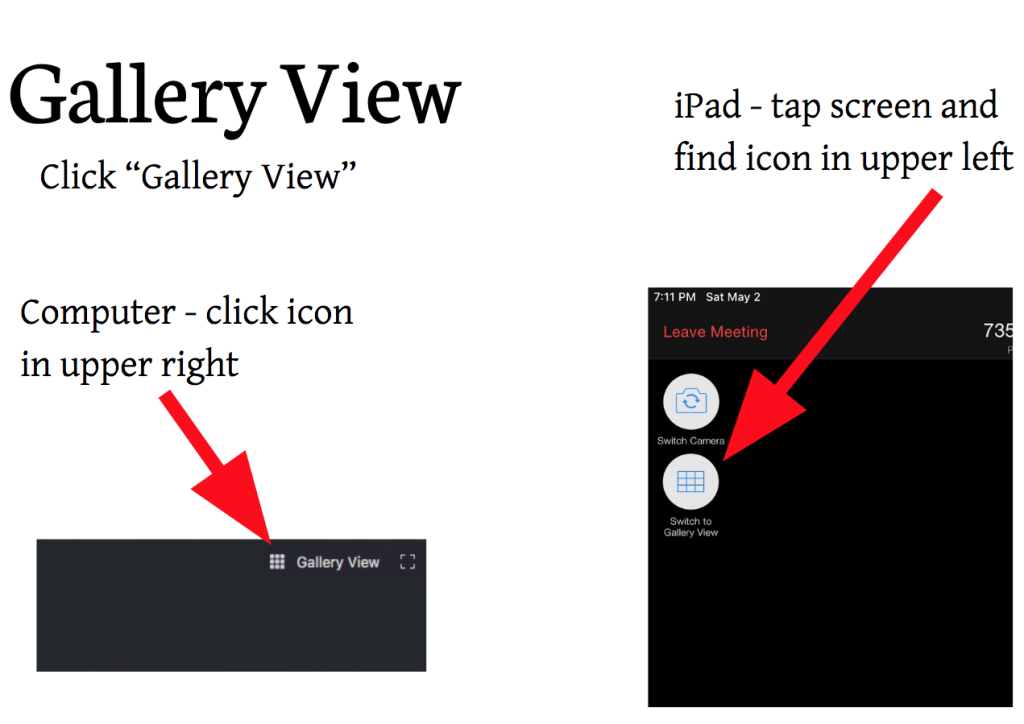
For the purposes of the activities I teach in Non-Boring Virtual Meetings, you’ll want to be in Gallery View. Here’s how you set that:
*The device you use to log into your meeting will determine how many participants you can see in gallery view.
- Desktop or laptop with Zoom app (will see up to 25 or 49 people, depending on how powerful your processor is. See this page for details.)
- Tablet (will see up to 9 people)
- Mobile phone with Zoom app (will see up to 4 people)
- Chromebook or web browser (most limited; can only see 1 person at a time, will need host to move you between breakout rooms)